

Невостребованное: Вы работаете в Adobe Dreamweaver?
Adobe Dreamweaver Отзывы: 4.1/5 — Отличный выбор
Adobe Dreamweaver является частью Adobe Creative Cloud который также включает Photoshop и Indesign. Платформа позволяет создавать и проектировать веб-сайты с помощью комбинации инструментов визуального редактирования и редактирования HTML. С помощью Dreamweaver веб-дизайнеры имеют возможность создавать полностью адаптивные сайты и воплощать свои идеи в жизнь, особенно с точки зрения дизайна и функциональности. Решение также предлагает поддержку нескольких мониторов для Windows и наиболее подходит для разработчиков с обширными знаниями в области кодирования.

| Segment |
Малый бизнес
Средний рынок
Предприятие
|
|---|---|
| развертывание | Облако / SaaS / веб-интерфейс, настольный компьютер Mac, настольный компьютер Windows |
| Поддержка | Круглосуточно (живой представитель), чат, электронная почта/служба поддержки, часто задаваемые вопросы/форум, база знаний, поддержка по телефону |
| Обучение | Документация |
| Языки | Английский |
Adobe Dreamweaver Плюсы и минусы
- Adobe Dreamweaver легко интегрируется с другими инструментами в Creative Cloud.
- Он идеально подходит для разработчиков со знаниями в области кодирования.
- Вы выиграете от полной настраиваемости и контроля над своим веб-дизайном и отзывчивостью.
- Adobe Dreamweaver поддерживает HTML5.
- Если вы не умеете программировать, Adobe Dreamweaver предлагает крутую кривую обучения.
- Adobe Dreamweaver не очень доступен по цене. Помимо программного обеспечения, вам все равно потребуется защитить свой собственный веб-хостинг и доменное имя, прежде чем ваш веб-сайт сможет начать работу.





Сравнить Adobe Dreamweaver с другими популярными инструментами в той же категории.
Мне нравится, что Dreamweaver предлагает два варианта дизайна. Можно создавать дизайн с помощью кода (HTML) или с помощью визуального дизайна. Я освоил оба варианта, что было здорово. Но поскольку я в основном графический дизайнер, визуальный аспект оказался для меня чрезвычайно полезным. И мне это очень понравилось.
Мне почти ничего не не понравилось.
Adobe Dreamweaver обеспечивает превосходный внешний вид вашего веб-сайта. Он аналитичен и визуально привлекателен.
I love how user friendly the interface is since it's very similar to the programs I use the most being photoshop, illustrator and indesign.
The program had a lot of glitches for example when I would work on a project the program would shut down completely.
I'm able to create websites that are more customized as opposed to using templates from websites like Squarespace.
Этот продукт очень прост в использовании. Мне нравится, что я могу видеть, что меняю на своем сайте, прежде чем вносить изменения.
Некоторые аспекты этого программного обеспечения несколько сложнее в использовании, но в целом оно работает хорошо.
Мы с легкостью поддерживаем актуальность нашего сайта, используя Dreamweaver.

IDE от Adobe отлично подходит для веб-дизайна. Я использую Creative Cloud, и это одна из моих любимых программ. Adobe постоянно выпускает обновления, а шаблоны просты в использовании и при этом очень привлекательны. Они позволяют легко перемещаться по файлам. Цветовая гамма помогает различать типы кода. Очень удобна в использовании. Сейчас я работаю над PHP-проектом, и мне очень нравится работать с этой IDE. Она помогает мне очень легко настроить проект.
Этот продукт очень сложно не полюбить. В нём много функций, которыми я пользуюсь, и я бы хотел использовать их все.
Я занимаюсь веб-дизайном, и иногда самостоятельно создавать шаблоны бывает сложно. Dreamweaver предоставляет мне отличные шаблоны и CSS-стили. Я обнаружил, что использование Dreamweaver значительно упростило мне процесс проектирования и работы над моими проектами.
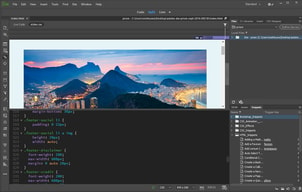
I like how easy this software is to use. I'm a very visual person so having visual options is nice. For instance, having the split screen makes it convenient to see what the page will look like while I'm editing the code. I also like being able to edit directly on the page too, when it comes to editing text.
No dislikes. So far I've found everything I need. I'm a fairly new user, so I'm still learning. So far, I'm really loving it! I'll be taking a class soon to learn more, so just exploring for now.
Not any business problems yet. It's been beneficial in setting up a team page for my department, which is what I'm using it for so far.
DreamWeaver allows newbies to create professional looking web sites with little to no experience or knowledge of web design. The software allows you to create by aesthetics or by code, making it perfect for any level of design professional or, in my case, a volunteer at a non-profit arts org who got tapped for the web master position by virtue of being a Millennial, and therefore "good with this stuff." Thankfully, it really was that easy.
It's pricey. Worth it, but pricey. Keep in mind, this is coming from a non-profit that performs free concerts. A for-profit would not have this concern. (Also, there are discounts and grants for non-profits, so don't let the cost discourage you.)
We eliminated the cost of hiring an outside web design pro for our tiny non-profit. It also allowed us to update and change the site often - the new web master added a section that follows the top artist's location as he performs and teaches around the globe.
Возможность настройки: Использование переменного разделения экрана для режима кода/предварительного просмотра. Мгновенные визуальные подсказки об ошибках HTML в коде (цвета). Возможность выбора элементов HTML одним щелчком (например, целого DIV). Это уменьшает количество ошибок, которые обычно допускают люди при ручном выборе фрагментов кода. Возможность быстрого предварительного просмотра контента на разных устройствах.
Я думаю, что режим предварительного просмотра (в отличие от исходного кода) полезен лишь для очень смутного представления о том, как будет выглядеть контент. Я бы также не стал использовать его для *создания* контента, потому что уверен, что он не будет адаптивным или даже не будет работать так, как задумано.
Предоставление возможности редактирования HTML-кода даже сотрудникам с ограниченным опытом работы с HTML.
Many tutorials online making it very easy to learn new skills. I love that you can also easily switch over to Adobe Photoshop.
I think it's harder to use than the other adobe products.
Email blasts with CSS.
Dreamweaver offers both a robust code view as well as an intuitive WYSIWYG editor. Code completion, native support to FTP and HTTP uploads, quick access to style sheets and script editing screens make this one of my favorites for web development.
Support for ASP Classic and ASP.net would be great. At this time, you can edit ASP code, however their is no virtual server to serve the pages to a browser. This means, if you use include files or any ASP specific code in your project, you will not be able to view it without uploading them to an IIS server.
I use Dreamweaver to make weekly updates to our product web sites. It is easy to use and allows me to complete projects with ease.
I love the intuitive interface. I have used many html editors and nothing compares to Dreamweaver. Dreamweaver makes it easy for me to design and create html, php, java and other type of websites. Every page has all of its files integrated, which allows me to jump into .php, .js, .css (and other extension) files without needing to open one by one. It is also a great tool for beginners, for those who wish to start creating websites. I love the split view, which allows me to see how my design is going. It really makes it very easy. I has a lor of great other features, which wont allow me to list them all here!
It has so many features and it is a very complete piece of software. Perhaps more available and detailed documentation from the developer would make it much more easier to use. Aside of that everything is great! I Love it!
My own company website creation. Learning how to use dreamweaver allowed me to dig more into html. Now i dont have to hire expensive companies to design my website. I can do it myself with this tool and make it however i want. Even if I want to update my site, I use this tool and no extra money is spent!
Мне нравится режим разделенного экрана, потому что я могу видеть, какие изменения в дизайне происходят по мере внесения правок в код.
Это немного нелогично. Если бы я раньше не пользовался другими программами в Creative Cloud, я бы, наверное, понятия не имел, с чего начать.
Я использую Dreamweaver для создания HTML-макетов электронных писем, что дает нам гораздо больше гибкости по сравнению с JPG или другими программами для работы с почтой.
Offers built in support for multiple platforms. One of the few programs that shows you live updates side by side when making changes.
Any creative cloud app including dreamweaver can be sluggish at times especially the more complex the project.
Mobile website updates. Easy support in dreamweaver to view live changes.
I like that it allows you to grab a section of code using the arrows at the bottom of the screen
Wish it could line the code up automatically instead of having to do it manually (if not starting from scratch)
Building emails quickly and easily. Toggling between design and live view is helpful. Wish it gave previews of mobile vs desktop as well for responsive.

Dreamweaver has been critical in improving my HTML, CSS, Javascript, and PHP coding. For a marketer that designs websites, emails, and landing pages, I have found it's interface to help me quickly highlight errors in code and fix them. I love how Dreamweaver can distill my code into something legible when some tools (e.g. WordPress) does not always have the most aesthetically pleasing code editors. My day to day involves me using Dreamweaver to edit/create code, and then copying/pasting it into my Marketing tool (e.g. WordPress or Marketo)
Sometimes when editing PHP files, Dreamweaver hangs because it has to update all of the URLs and will crash. This might just be poor optimization or use on my end, but it sometimes crashes when I edit PHP files.
Without a front end resource at my disposal, I had to teach myself basic code to create and edit websites, emails, and landing pages. Dreamweaver helped spot check my code and quickly accomplish things that would have normally taken me days or weeks to do. With Dreamweaver, I feel confident when troubleshooting code errors because I know it can help highlight those issues quickly and provide flexibility in reading various types of files.
Использовать его очень просто. Я не знала, как пользоваться системами обновления сайтов, но быстро разобралась. Мне очень нравится!
Хотелось бы, чтобы было больше руководств пользователя. Я не уверен, как делать некоторые вещи, которые мне нужны, и мне постоянно приходится обращаться за помощью в ИТ-отдел моей компании, вместо того чтобы иметь возможность воспользоваться простым руководством пользователя. Если бы интерфейс был более интуитивно понятным, это было бы очень полезно.
Мы смогли создать собственный веб-сайт отдела с помощью DreamWeaver. Я могу быстро и легко обновлять страницы по мере необходимости.

Awesome product for beginner/intermediate coders! Easy to use, view is extremely helpful.
It's a little tricky to grasp at first but there's a lot of help and support.
It has helped me code much better. It has been a huge help because numerous people on our team can access it at once. It's user friendly and the training is really helpful.
Подсветка и форматирование HTML/PHP в режиме просмотра кода очень полезны.
Модель подписки проблематична. Новые версии Creative Cloud не так стабильны, как должны быть.
Быстрое создание веб-страниц.
I use a lot of different technologies and languages to develop my web solutions. Many times it is much faster and better quality to build on top of an existing open sourced solution, which means that I have to learn the language and technology. I have found that Dreamweaver supports a wide variety, and makes it a bit easier by helping with the related syntax. The support for HTML, CSS, PHP, JavaScript, etc. have helped me to manage the different projects. I also like that I can set up multiple site/projects with the credentials and server connections. This allows me to store, work and test code locally, then automatically upload to the site. It also manages dependent file uploads, so I don't miss an image or other needed asset. I like the integration with other software, such as Fireworks.
I find that when I have had to transfer the application to a new PC, I have had to recreate my accounts. The previous versions stored the site configurations in the register, so it was not easily migrated. I have not migrated to a new computer recently, so I don't know if they have resolved this issue. Each new version takes a little time to re-train, because they tend to make lots of GUI changes.
Authoring, file management and FTP uploads of website code and assets.
I like the color coding while in code view
I don't like the fact that when you update the code it does not update in the live view right away. It takes a while to update.
Creating email templates.

I love the way I can write, organize, validate my code with Dreamweaver. It is very simple to use. It is a good thing to use when hand coding.
Adobe can be very glitchy. Sometimes I can't get it to hilight a word when I need it to because it is "thinking".
Rasy way to efficiently write code.
Мне нравится, насколько легко пользоваться программой и как быстро можно вносить изменения на веб-сайты.
Просто очень много разных способов и функций, которые нужно освоить. Когда начинаешь знакомиться с платформой, она кажется довольно сложной и даже немного пугающей.
Отлично подходит для быстрой коррекции и внесения изменений в веб-сайт при необходимости его обновления.
Adobe Dreamweaver not only allows me to see what I code, but helps me learn in the process.
At first, it is really hard to understand, and not all tutorials are clear.
We've used Dreamweaver to redo websites and overall change our look.

It's very easy to work with. As well as very easy to teach someone how to use it, about coding and how to dive in and find problems while working with code. The dual framing, html and code view makes making emails and webpages very easy.
There nothing coming to mind I dislike about this product.
When we need an email made very quickly, it's easy for myself to get into Dreamweaver and crank it out. It's much faster than doing the templates in our ESP. I would highly recommend this when emails need to be out in a very short amount of tim.
Does anything you need to code, test, debug.
Nothing. It does what I need it for. Maybe an out of box integration to top CMS platforms.
Strips basic styles from Photoshop designs. Debugs as you code. Works between site files for a seemless experience.
Ease of use and intuitive code libraries and typeahead.
Little clunky when using ftp features. Some initial workspace configuration required to get it just the way you like it. This is all subjective though - you can get going without this process.
Development of all our applications, and websites.
Dreamweaver — самый простой в использовании инструмент для веб-дизайна в моём арсенале. Программирование тоже очень простое, особенно учитывая, что я обычно пишу большую часть кода от руки.
Некоторые WYSIWYG-редакторы на самом деле немного проще в использовании, но всякий раз, когда я пробую что-то другое, я возвращаюсь к DW.
Используется для создания, преобразования и управления множеством веб-сайтов.
All the functions I need to build excellent web projects are located within one easy to learn program.
The program is not free, and tends to be a resource hog on low end machines, but this is common with most adobe programs.
I used Dreamweaver to help develop multiple web project for my own business. Once you learn the software it is a pretty powerful toolkit.
I don't know how to code very well, but my coworker gave me a template and now it's so freaking easy thanks to Dreamweaver. I like clicking where I need to so I can find where the edit is easily.
I don't really have a dislike except that I should learn better.
Fast turn around for mailchimp emails.
The ability to create your own website and fttp links.
The fact that is not set up for html5. I need my flash based files to open without flash being installed.
I'm able to build websites for client therefore bringing revenue to the company.

To preface this review, I am in no way a professional website builder, nor do I know all the features of Adobe Dreamweaver. I do however use Dreamweaver to edit and write simple and basic HTM-- specifically templates for personal websites. I like that it is user friendly and easy to teach.
The only issue I've come across when using Dreamweaver is that when editing HTML live, it lags quite a bit. But that's honestly probably due to my laptop and/or the other applications I have opened. Other than that, there is nothing I really dislike about the program. It does its job and is easy to use.
It's not really classified as a problem. It just helps me build my websites for the business I run, as well as personal website that I build for myself and/ or for friends.